
Hey, Ty here. Conditional logic is now here!! 🎉
You can now build:
- Quizzes that keep score and show each person their result.
- RSVPs that only ask about guests when someone’s actually coming.
- Quote calculators that add up an estimate as people answer.
- Eligibility checkers and lead qualifiers that point people to the right next step.
- Support forms that send each problem to its own page.
Your form changes as people answer. Questions appear when they’re relevant, pages get skipped when they don’t apply, and everyone ends up somewhere that makes sense for them.
It was top of the list in my last update, and most of it is free. There are templates for the quizzes, RSVPs, calculators and other forms above.

There’s plenty more since then, too: funnels and journeys, a new Summary tab, and a few new question types. They’re further down.
Only ask what applies
Take an RSVP. If someone says they can’t make it, there’s no reason to ask how many guests they’re bringing.
In the Event RSVP template, a “No” finishes straight away with a friendly thank-you. A “Yes” continues to a short page about guests and access needs. A “Maybe” gets its own ending, asking them to reply again once they know.
You can do the same with any form:
- Show or hide a block when an earlier answer matches. That works for questions, text, headings, images and more.
- Show a choice option only when it’s relevant.
- Require a question only sometimes, like a company name for business bookings.
- Skip pages or send people to a different page, or a different thank-you page.
A question someone never sees is never required, and its answer isn’t sent. The conditional logic guide walks through each of these.
Getting the editor right

The logic itself wasn’t the hard part. Working out where you add it was.
I tried four versions while building the logic editor, all in about ten days. I started with simple Show when rules on questions. Then I tried separate logic blocks in the form, and then rules in a sidebar that could change several things at once. Each one solved something, and each time there was a bit I couldn’t explain clearly.
The sidebar version is where it clicked. Showing a question and deciding where Next goes happen at different moments, but I’d put them under the same controls. It made the whole thing harder to follow, even for me.
So the version I’m releasing works on one idea: logic lives with what it changes. A question knows when it’s shown. A page’s Next button knows where it goes. A thank-you page knows where it sends people. If you want to know why something is hidden, look at the thing itself.
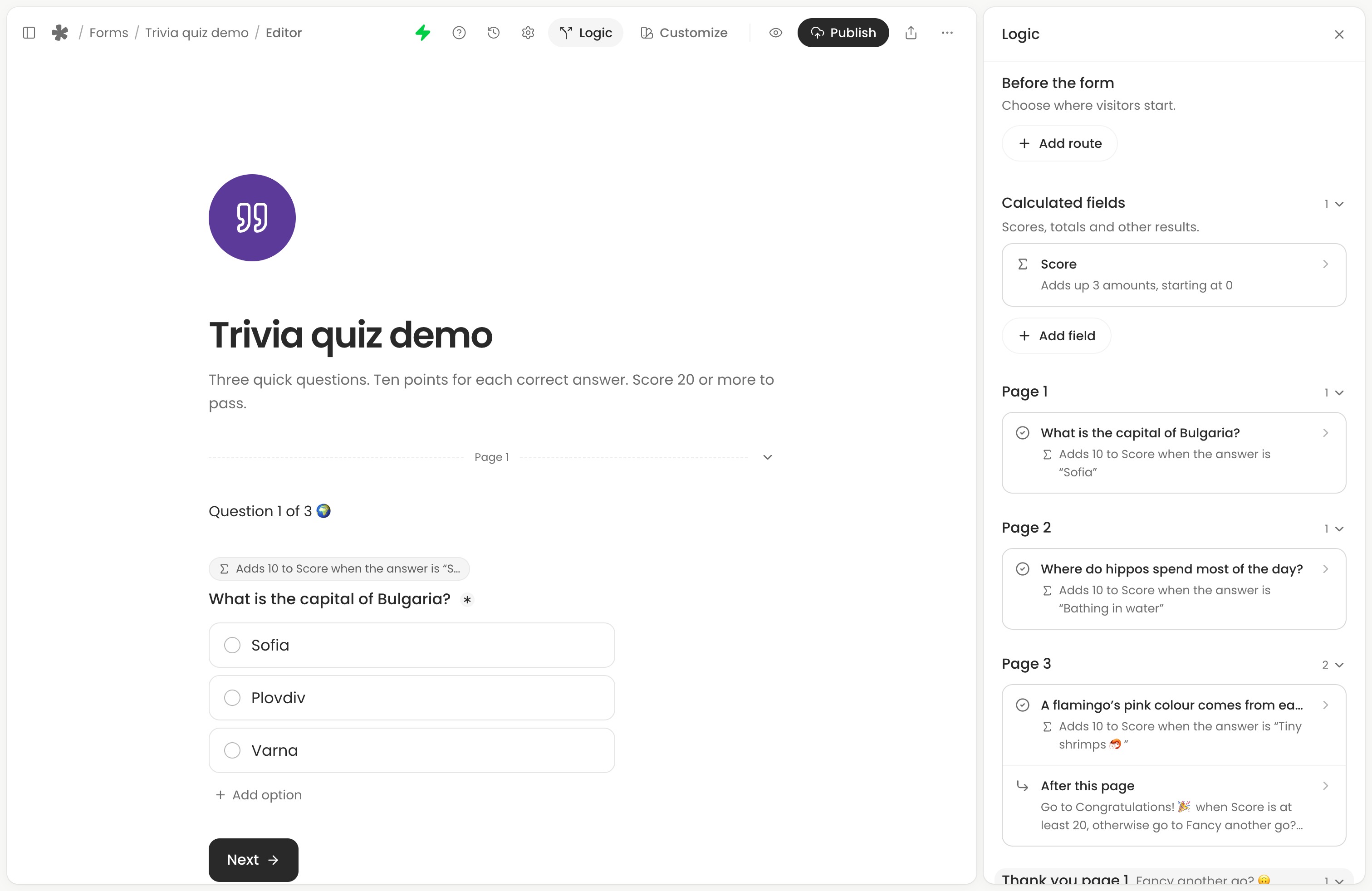
To see everything at once, open the Logic panel from the editor header. It lists all of a form’s logic, page by page. There’s more on how it works in the Logic panel guide.
Scores, estimates and results

Calculated fields work things out from someone’s answers, then you can show the result later in the form by typing @.
The Quiz template is the simplest example. There are three questions, worth 10 points each. Score 20 or more and you get “You passed!”. Anything less gets “Fancy another go?”. Both endings show your score.
You can also use a field to pick a result, like the personality quiz does, or to name a condition once, like Is a business, and use it wherever you need it. Use calculated fields covers all four kinds.
The recipes guide has a few more ideas, from instant estimates to campaign welcomes.
Where people came from

Logic can also read journey details, which are about how someone got to your form: their device, browser, the site they came from, the UTM tags on your link, their language, and whether the form is embedded on a website. These are known from the moment the form opens, so they work on the very first page.
For example, you could welcome people from your newsletter with a text block that only shows when UTM source is newsletter. That’s free too.
On Creator, you can go a bit further:
- Routes before the form choose where someone starts. Start newsletter readers on page 2, or show phones a page saying it works better on a laptop.
- Redirects after submission can send each thank-you page somewhere different, like the App Store for people on iOS. The web address can include their answers.
These details help you personalise a form. They aren’t a way to check who someone is. See journey details, routes before the form and redirects for the details.
Try every path before you share

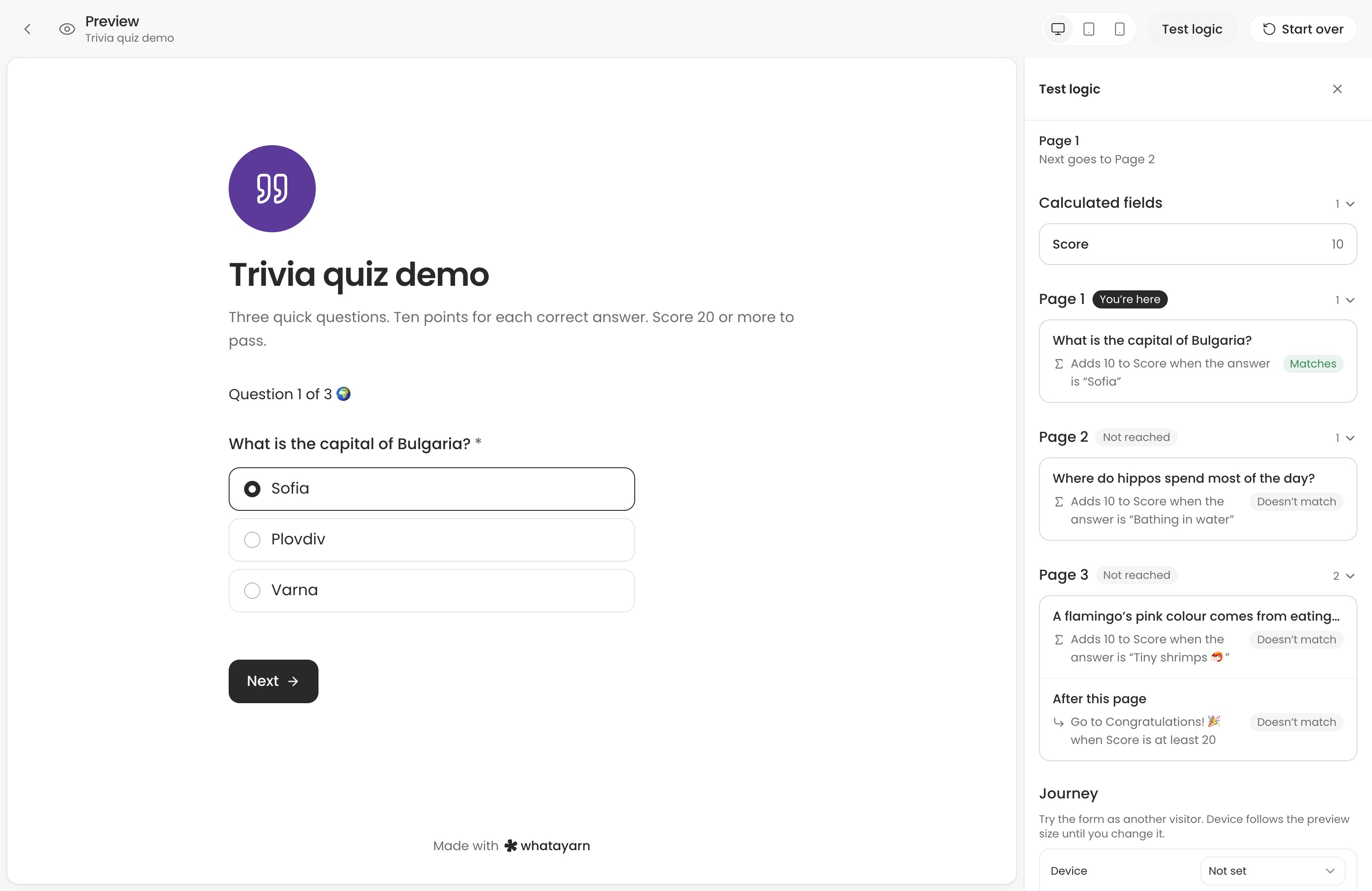
Open Preview, then Test logic. It goes through your form page by page and marks the one you’re on. You can see what each calculated field holds right now, which conditions match, and where each page goes next. You can even try the form as a phone visitor from Instagram.
Change an earlier answer and watch the follow-ups, score and route update. Drafts save as you go, but logic that can’t work won’t publish, and its label in the editor turns red with what to fix. Here’s a checklist for testing.
Once responses come in, a question someone skipped shows as Skipped rather than a blank.
Funnels and journeys

The drop-off and journey analytics I mentioned last time are here too. They go nicely with logic, because you can see the path each person actually took.
On Creator, Insights has:
- A funnel, from people who opened your form to people who started, each page they reached, and who sent it. Each page has a slice for each question, to help you spot where people stop answering. A page logic skipped doesn’t count as somewhere someone gave up.
- Journeys, one row per attempt, marked Completed or Partial. Open one to follow their page visits, answer changes and returns after more than 30 minutes away.
- Traffic you can click. Select a source, browser or device, and the whole page filters to just those people.
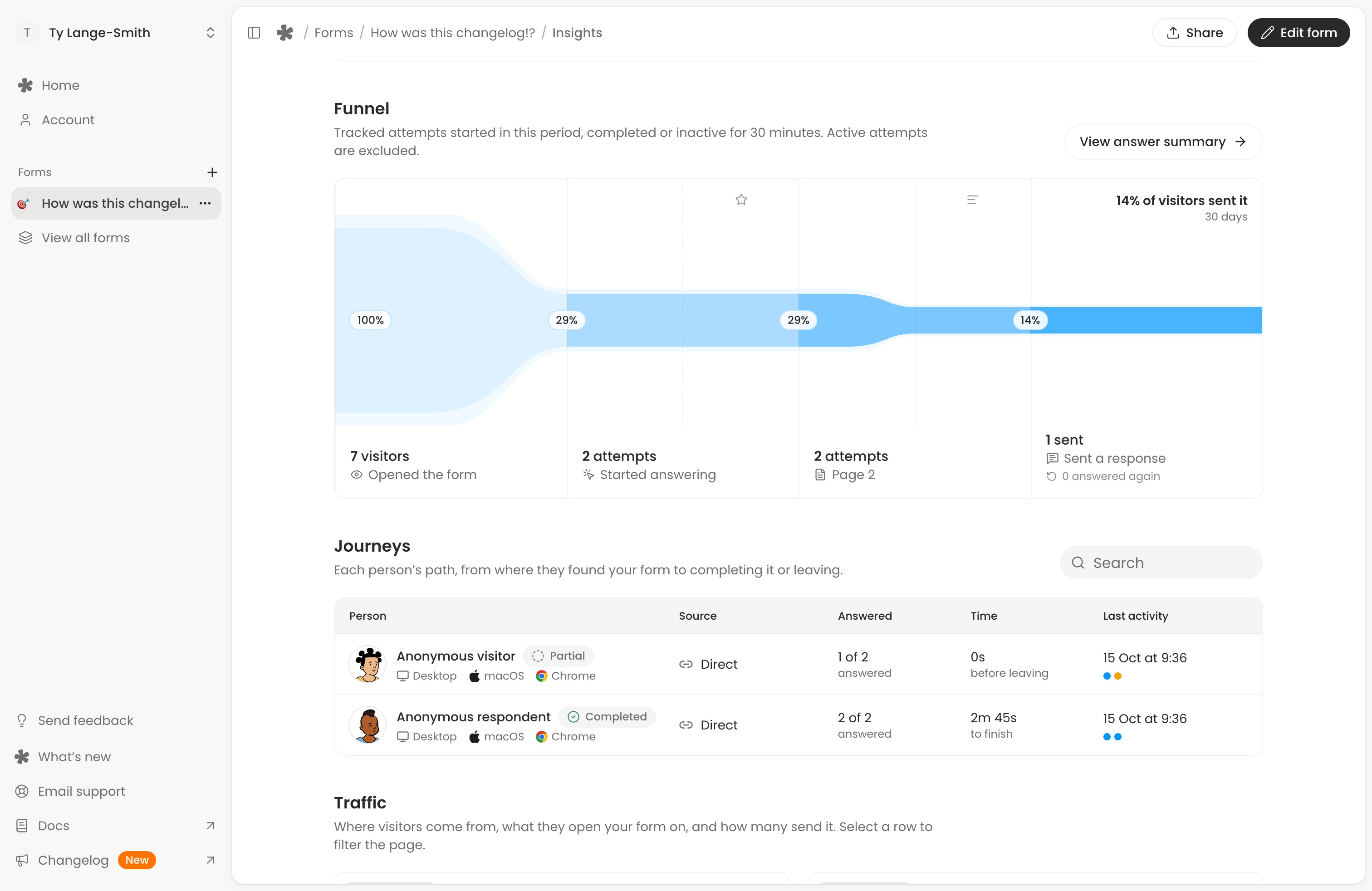
On Free, select Show sample data to try these panels with made-up activity on your own questions. Understand your form insights explains each panel and how we count.
Some of this is on every plan, too. Completion rate is now responses divided by people who started, not by everyone who opened the link. Bots and link previews are left out, and your own signed-in visits aren’t tracked. And in Responses you can add journey columns, like Time taken, Stopped at, Came back and Campaign, then sort or export them.
A Summary of every answer
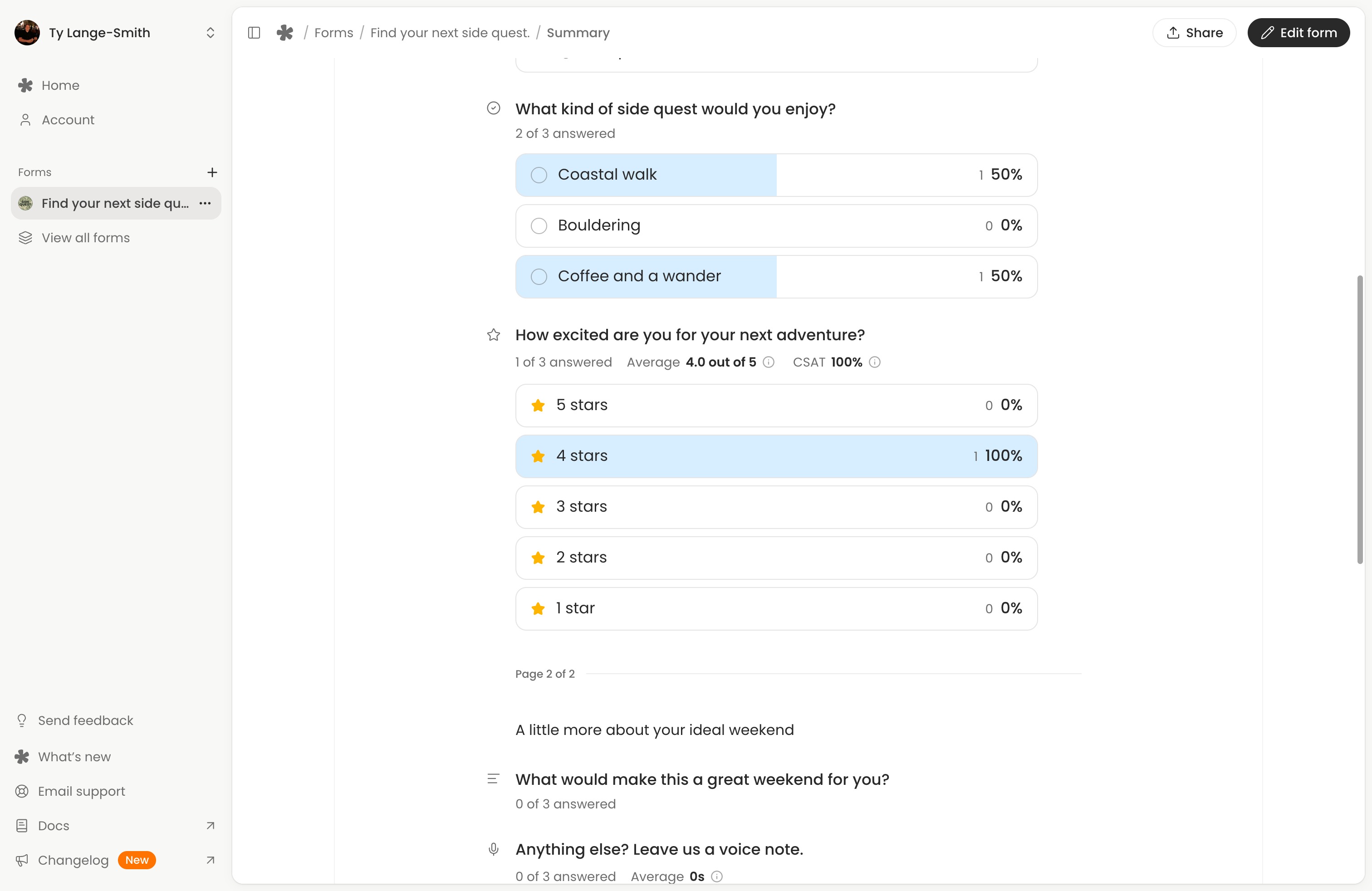
There’s a new Summary tab on every form. It groups completed answers in your form’s order, with your text and headings beside the results. Calculated fields show up there too, so you can compare quiz scores or estimates across everyone.
Select an answer in a chart to filter the rest to the people who gave it. For example, select a low rating, then read what those people wrote. Summary is free, and the Summary guide shows what each chart means.
Everything else since last time
- New questions: time, ranking, matrix grids and signatures (one of the things I promised last time). See rankings, grids and signatures. Scales also have NPS and CSAT presets now.
- Richer text: lists, quotes, code blocks, links and strikethrough in the editor, and formatting carries over when you paste from Google Docs or Notion.
- Submit another response: a button on the thank-you page so someone can answer again. It’s on by default and free.
- Duplicate a form, with its settings and AI columns, from the form’s menu.
- Delete old responses automatically after a period you choose, on Creator.
- Template pages: browse every template on the website and try each one before you sign up.
What’s free
Nearly all of it. Showing and hiding, sometimes-required questions, page routes, different endings, calculated fields, journey details in conditions, Test logic, Summary, journey columns, the new questions and the templates are all on Free.
Creator adds routes before the form, website redirects after submission, the funnel, Journeys and traffic filters in Insights, and automatic response deletion. The pricing page has the full comparison.
What’s next
- Integrations, like Google Sheets and webhooks.
- Closing a form on a date or after a set number of responses.
- Polish. Lots of small rough edges to smooth over.
I’m also exploring forms a group fills in together, like live polls that show results once you’ve voted, and boards where people add ideas and upvote each other’s. It’s early, so tell me if you’d use them.
For logic, I’d really like to hear what you build, and anything that feels fiddly. Start a new form, add one follow-up question, test both answers in Preview, and let me know how you go through the form below.
Thanks for being here.